Ballance is a level-based puzzle game. The player has to move a ball t hrough a hovering maze of paths and rails. When moving, the player will face many mechanical obstacles like seesaws, suspension bridges, pendulums etc. to overcome. It is the aim of the game to reach to the end of each level without dropping the ball. Ballance takes its special appeal from the physically realistic simulation of its elements. A good feeling of the ball's inertia and an understanding of simple mechanical processes will enable the player to succeed.
 The special feature of the ball is that the player can change its material, and thus its physical properties. The material can be changed from wood to stone or paper. For changing the material of the ball, the player has to steer the ball onto one of the transforming fields (transformers) that can be found at various places in the levels. Ballance is played against the time. The faster a player gets through a level the more scores will be granted. Picking up various Extra Scores may provide the player with additional "time scores" or even an "extra life".
 everything finally depends on steering the ball - the element of intelligence reveals itself in the form of "physical puzzles". These puzzles count on an intuitive grasping of the level architecture and the principles of simple mechanics. They often refer to the physical transformation of the ball. When exploring the world of this game and its rules, the view into endless depths gives the player a continuous thrill.
Website : http://www.ballance.org
Download Free : Ballance.exe (15 KB)
Translate This Blog


Status
Ballance Game
MondayDetection Speed USB Flash Disk
 USB flash disk is now the external storage medium that is loved by the users computer. In addition to small and practical shape can be carried anywhere, this device also has a storage capacity of a fairly large compared with the external storage media the previous generation, such as floppy disks.
See, in every computer exhibition that opened in shopping malls around us, visitors are most enthusiastic young man approached the booths showing off. There are just looking, some are deliberately using the moment to buy computer devices are offered. Usually, with a computer exhibition, but we can find new products on offer will also get a better side than on weekdays. Like the flash disk products offered. Not infrequently flooded exhibition stand visitors or buyers until the stock is sold out. Perhaps a cheaper price common reason for them to buy it because it now has a product that has superior performance at a cheap price to be a very pleasant thing.
However, when relying on a cheap price reasons alone insufficient, because in addition to price there are several other criteria that can be taken into consideration when buying a flash disk device. Among storage capacity, brand, shape / model, and security features. Of course, with consequences we are preparing a larger cost too. But there are other considerations that are not less important, namely speed. For speed specification is implicit in the packaging, but it does not guarantee its accuracy. Not necessarily match the speed shown original speed when used.
There are some free applications to check read and write speed. As quoted udaramaya.com, there are some applications that can check the speed flash disk. One of them is HD Speed. This application supports the data storage format FAT and NTFS with system operation WinNT4, Win2000, WinXP, Win2003, and WinVista. In addition to measuring the speed of data transfer, HD Speed can also perform tasks measuring the speed of data transfer on other storage media such as hard disk, CD / DVD-ROM, floppy disks, and flash cards. The size of the file on this application 80 Kb and not have to do the installation because it can be directly executed.
When running this application first thing to do is to choose the storage media will be checked speed, then click the Start button. After that result from reading and writing processes are recorded will be displayed in graphical form along with the speed that time and the average with a unit that can be edited and also the number of errors if any. This application can be downloaded from http://www.steelbytes.com/?mid=20. Another application is capable Check Flash check and data transfer speeds that have checked the error, and pass the task of formatting the flash disk. Check Flash that has a capacity 340 Kb file created by Misha, a programmer from the Ukraine. Application memory consumed is only 812 kB and can also run directly without having to first install process. To get this application, please visit http://mikelab.kiev.ua/index_en.php?page=PROGRAMS/programs_en address
Flash Memory Toolkit is not less interesting. This is a media package for Flash-based storage. Options package provided include detailed information providers such as device capacity, file system, operating system, and device settings.
This application is able to securely delete files and can restore it after the format, and able to detect errors / damage in the device. Not to miss also backup and restore facilities that can be run simultaneously.
But the Standard version is provided free of charge only able to display the speed of reading. If want to learn to read and write speeds will be required to upgrade to Pro version. To be able to use this application we must first install it into the PC.
Flash Memory Toolkit has a file size of 766 Kb, and can be used on Windows operating systems 2000/XP/XP 64-bit/2003 Server / Vista. This application can be downloaded through the site http://www.flashmemorytoolkit.com/.
With these applications, we will find out the number written on the speed of a flash disk or rounding numbers only difference is even quite different. Please try, what kind of applications as needed.
Internet Download Manager
SundayInternet Download Manager is a tool to increase download speeds by up to 5 times, resum
 e and schedule downloads. Comprehensive error recovery and resume capability will restart broken or interrupted downloads due to lost connections, network problems, computer shutdowns, or unexpected power outages. Simple graphic user interface makes IDM user friendly and easy to use.Internet Download Manager has a smart download logic accelerator that features intelligent dynamic file segmentation and safe multipart downloading technology to accelerate your downloads. Unlike other download managers and accelerators Internet Download Manager segments downloaded files dynamically during download process and reuses available connections without additional connect and login stages to achieve best acceleration performance.
 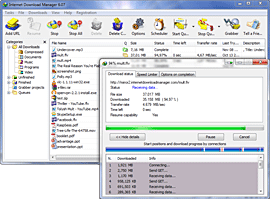 Internet Download Manager supports proxy servers, ftp and http protocols, firewalls, redirects, cookies, authorization, MP3 audio and MPEG video content processing. IDM integrates seamlessly into Microsoft Internet Explorer, Netscape, MSN Explorer, AOL, Opera, Mozilla, Mozilla Firefox, Mozilla Firebird, Avant Browser, MyIE2, and all other popular browsers to automatically handle your downloads. You can also drag and drop files, or use Internet Download Manager from command line. Internet Download Manager can dial your modem at the set time, download the files you want, then hang up or even shut down your computer when it's done.
Other features include multilingual support, zip preview, download categories, scheduler pro, sounds on different events, HTTPS support, queue processor, html help and tutorial, enhanced virus protection on download completion, progressive downloading with quotas (useful for connections that use some kind of fair access policy or FAP like Direcway, Direct PC, Hughes, etc.), built-in download accelerator, and many others.
Version 5.17 build 4 adds IDM download panel for web-players that can be used to download flash videos from sites like YouTube, MySpaceTV, and Google Videos. It also features complete Vista support, YouTube grabber, redeveloped scheduler, and MMS protocol support. The new version also adds improved integration for IE and IE based browsers, redesigned and enhanced download engine, the unique advanced integration into all latest browsers, improved toolbar, and a wealth of other improvements and new features.
Website : www.internetdownloadmanager.com
Download Full Version : IDM.exe (2.8 KB)
